
Nowadays, PoE switches are widely adopted by individuals and industries for IP network cameras. Typically, different types of PoE network switches are deployed for various IP camera systems. The following guide provides in-depth insights on how to select the appropriate PoE switch for your IP camera system.
What is a PoE Switch for Network Cameras?
PoE stands for Power over Ethernet. It is a technology designed to simplify cabling by transmitting both power and data simultaneously over a single Ethernet cable (such as Cat5, Cat5e, and Cat6).
PoE switches typically feature multiple ports to support more than two IP cameras. Consequently, they can power PoE devices, including IP cameras, computers, VoIP phones, and other network-enabled devices.
Currently, PoE switches are universally used in security surveillance systems. This is not only because Ethernet cables are cost-effective and easy to run, but also because PoE and IP technologies support high-resolution cameras, thereby providing superior video quality for IP camera systems.
Why Use a PoE Switch for IP Camera Systems?
A PoE switch for IP network cameras is a device used to connect and power IP cameras via Ethernet cables. The primary function of a PoE switch in an IP camera system is to interconnect cameras with the NVR (Network Video Recorder) and transmit the data (video and audio) to be recorded on such devices. It usually comes with multiple ports to support multiple network cameras.
Furthermore, PoE switches with higher power output can supply electricity to IP cameras that require it. Typical issues such as video loss and poor IP camera performance often stem from insufficient power supply to the cameras.
In short, the benefits of using a PoE switch in an IP camera system include:
- Extended Range: IP cameras can be installed at greater distances.
- Increased Connectivity: More network cameras can be connected.
- Higher Power Output: Capable of providing greater power to network cameras.
- Easier Management: Activity LEDs on the switch aid in troubleshooting IP cameras.
How to Choose a PoE Switch for Network Camera Systems?
Having understood the benefits, we will guide you on how to select the right PoE switch for your system. You need to consider several critical factors outlined below.
1. PoE Switch Port Count
If you are looking for a PoE switch for a location with more than 4 IP cameras, you must check the port count—for example, 8-port, 16-port, 24-port, or even 48-port PoE switches. The number of ports largely depends on how many devices will connect to your PoE network switch and the total power consumption of your CCTV cameras.
2. PoE Switch Supply Voltage
Many cameras operate on 12V or 24V power. If the wrong voltage is supplied, the IP camera can easily overload or stop working. For instance, if a 24V IP security camera is powered by a 12V source, or vice versa, the CCTV camera is likely to burn out or fail.
3. PoE Switch Power Budget
Another crucial factor is the maximum power supply of the PoE switch. The ability of a PoE network switch to power connected devices depends largely on the size of its power supply, ranging from slightly above 50W to well over 500W. This Power Budget directly affects how much power the switch can deliver per port to connected devices.
If the maximum power requirement of all your cameras exceeds the power cap of your PoE switch, the switch will not be able to provide sufficient power to all IP cameras. For example, a 24-port PoE switch with a 370W power supply can power 24 IEEE802.3at standard cameras (15.4W per port), but it can only power 12 IEEE802.3at standard cameras if they draw 30W per port.
To determine the available power per port, use the following formula: Max Average Power per Port=Switch Max Power Consumption−Switch System PowerNumber of PoE Ports\text{Max Average Power per Port} = \frac{\text{Switch Max Power Consumption} – \text{Switch System Power}}{\text{Number of PoE Ports}}Max Average Power per Port=Number of PoE PortsSwitch Max Power Consumption−Switch System Power
4. PoE Switch Maximum Power Output
The maximum power output is vital. If your surveillance cameras require more power than the PoE switch’s maximum limit, the switch will fail to power all your PoE IP cameras adequately—especially PTZ (Pan-Tilt-Zoom) IP cameras. Insufficient power leads to video loss and poor performance.
5. PoE Switch Bandwidth Capacity
In addition to power, IP cameras require network connectivity provided by the PoE switch. Different types of switches offer varying bandwidth capacities. For example, a Fast Ethernet PoE switch offers 10 to 100 Mbps bandwidth, while a Gigabit PoE switch provides 1 Gbps.
Using a Gigabit PoE switch ensures your CCTV network connection will not bottleneck; it guarantees the reception of full video and audio recordings from the cameras. Additionally, high-capacity PoE switches allow for the installation of higher quality cameras, such as 2K or 4K cameras, within the system.
6. Unmanaged vs. Managed PoE Switches
The difference lies in control and configuration.
- Unmanaged PoE Switches: These are “Plug-and-Play” devices requiring no setup, making them very easy to deploy. They are budget-friendly and suitable for most homeowners.
- Managed PoE Switches: These allow you to configure the network to your specifications. They offer better traffic monitoring and analysis, as well as remote control and adjustment for network administrators. This provides deeper insight into network status, connected clients, and power status. For large-scale surveillance projects like factories or enterprises, managed switches offer a more flexible network solution.
How to Connect Network Cameras to a PoE Switch?
Some users believe connecting IP or CCTV cameras to a PoE switch is overly complex. Below is an example using an 8-port Gigabit Managed PoE Switch to illustrate the connection process. In this scenario, different types of network cameras, a router, and an NVR are connected to the switch.
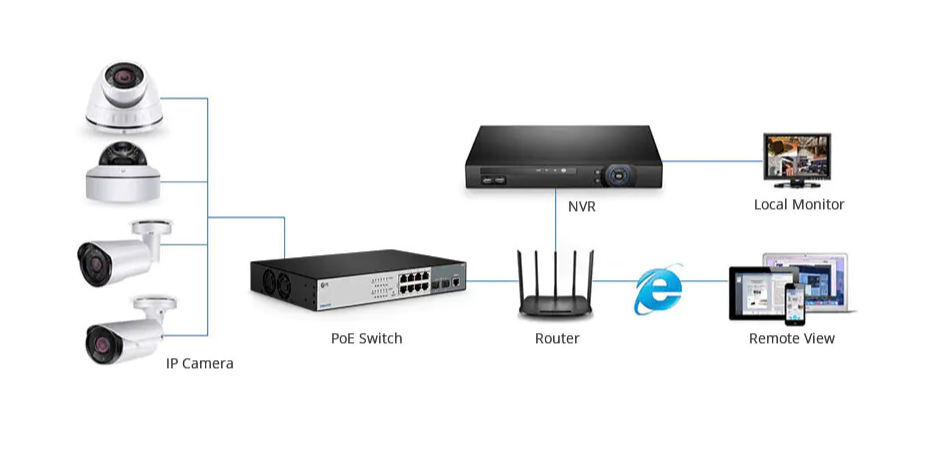
Steps to Deploy an IP Camera System with a PoE Switch:
- Use an Ethernet cable (Cat5e or Cat6) to connect the Router to the LAN Port (Uplink) on the 8-port PoE switch.
- Connect the power cord to the PoE switch and a power outlet or surge protector.
- Use Ethernet cables to connect the IP Cameras to ports 1-8 on the PoE switch.
- Add the cameras to the NVR to view the feed and enable recording. If remote viewing is required, ensure the router is connected to the internet.
Summary
PoE switches provide a simple and cost-effective wiring solution for powering IP or CCTV cameras. As mentioned above, for certain IP camera security systems, using a PoE switch allows the system to expand to the maximum number of cameras and enables longer cable runs for IP camera deployment